
Noota: an AI assistant to enhance user experience studies
UX Research
Key Goal
Examine key insights on using Noota by UX Researchers to conduct and analyze user interviews; identify platforms’ shortcomings and find ways to better support the entire research process.
Methodology
Data Collection: 5 in-depth diary study (45 – 60 minutes each) + 2 field studies + workflows across 3 key phases: transcription, analysis, and reporting
Method: Thematic Analysis
Participant Snapshot
Age: 28 – 43 years old
Gender: 4 women + 1 men (diary studies); 2 women (field studies)
Work experience: 2-8 years
Methods Breakdown
Field Studies (Contextual Inquiry)
To observe natural usage behaviors and challenges, we conducted contextual inquiries with six UX researchers in their workplaces. These sessions focused on:
- Reviewing transcripts within Noota
- Conducting thematic analysis
- Preparing research findings for reporting
We asked users to perform typical tasks (e.g., uploading an interview, correcting transcripts, identifying key quotes), while we observed and probed their behaviors and thought processes.
Sample Questions Used During Field Studies:
- “Walk me through your process for reviewing a Noota transcript.”
- “What steps do you take to identify themes?”
- “How do you move from this screen to sharing findings with your team?”
Diary Studies
To explore how frustrations evolved over time, we ran a 10-day diary study with five UX professionals. Participants logged their experiences using Noota after each task related to transcription or analysis.
Prompts Included:
- “What was the hardest part of working with Noota today?”
- “What issues did you encounter while organizing transcript data?”
- “Describe any workaround you used to get the analysis done.”
- “How did Noota support or hinder your ability to build a report today?”
Following the diary period, we conducted debrief interviews to unpack recurring themes and gather reflection on the experience.
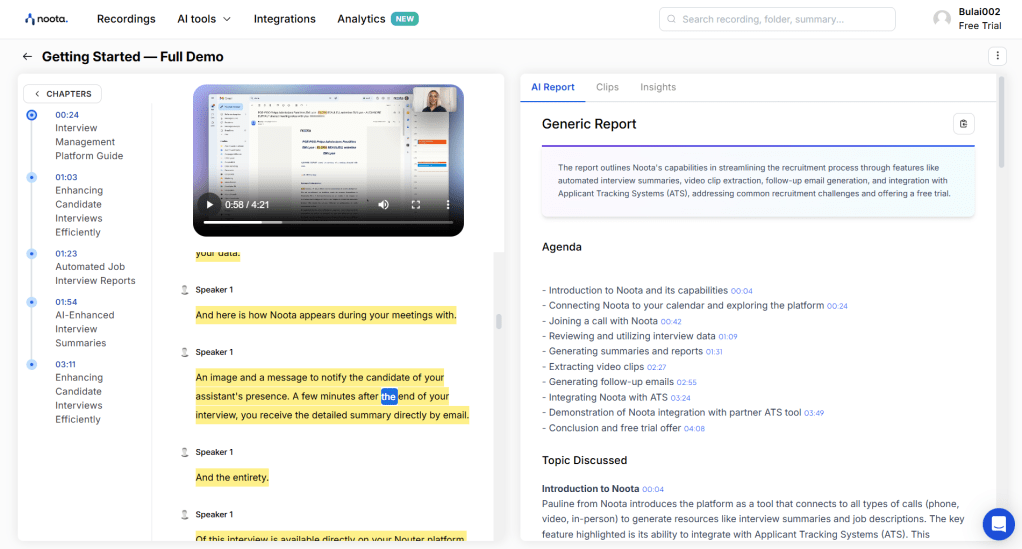
Noota Dashboard Snapshot
Key Findings
Transcription Accuracy & Editing Frustration
- Users consistently noted inaccuracies in transcripts, especially when dealing with accents, technical terms, and overlapping speech.
- Correction was described as “tedious” due to the lack of advanced playback controls and the manual editing interface.
- Nonverbal cues—pauses, tone, emphasis—were missed, leading users to constantly replay audio for context.
P2 “It feels like I spend more time fixing the transcript than analyzing the data.”
P4 “When Noota misses emotional inflection, the meaning of the quote changes.”
Speaker Identification Issues
- Auto-tagging frequently mislabeled speakers in multi-person interviews.
- This led to confusion and forced users to manually edit speaker attributions, which undermined efficiency.
P3 “I have to keep a separate note just to remember who’s speaking in each part.”
Limited Support for Thematic Analysis
- Researchers reported that coding and theme identification had to be done manually, often outside Noota.
- Noota lacked support for clustering quotes, tagging insights, or linking evidence across interviews.
P4 “I can’t really analyze patterns here—I export to Notion to do real synthesis.”
P6 “It’s hard to keep track of where a theme first appeared across sessions.”
Reporting Inefficiencies
- Participants noted a disconnect between data and reporting. Insights had to be exported and manually reformatted.
- Sharing insights with stakeholders lacked built-in support—no summaries, highlight reels, or story-building tools.
P2 “I have to screenshot quotes and paste them into my report. It’s messy.”
P3 “There’s no easy way to link my observations to evidence within the tool.”
Workflow Fragmentation
- Many users relied on external tools (e.g., spreadsheets, Notion, Airtable) for analysis and reporting.
- The lack of integration and smooth handoff between stages disrupted cognitive flow.
P4 “I do 60% of my job outside Noota because the tool just stops being helpful after transcription.“
Technical Limitations
- Diary entries highlighted repeated frustrations with audio quality sensitivity.
- Platform stability and inconsistent formatting also disrupted user confidence and workflow.
P1 “Sometimes the platform doesn’t pick phrases with lower tone.”
Recommendations
Based on our observations and diary entries, we suggest the following improvements:
- Enhance transcription accuracy: Improve speaker separation, contextual understanding, and error detection.
- Integrate analysis tools: Introduce tagging, clustering, and cross-interview insight tracking.
- Support nonverbal data: Add time-coded playback linked to quotes to help users assess tone and inflection.
- Streamline reporting: Create templates or drag-and-drop report builders that integrate quotes, themes, and visuals.
- Optimize speaker labeling: Use ML to auto-suggest speaker changes based on vocal characteristics.
- Offer integrations: Allow export/import with Notion, Miro, or Airtable to keep workflows fluid.
A new User Flow allowed Noota to address users’ frustrations and expand platform capabilities:
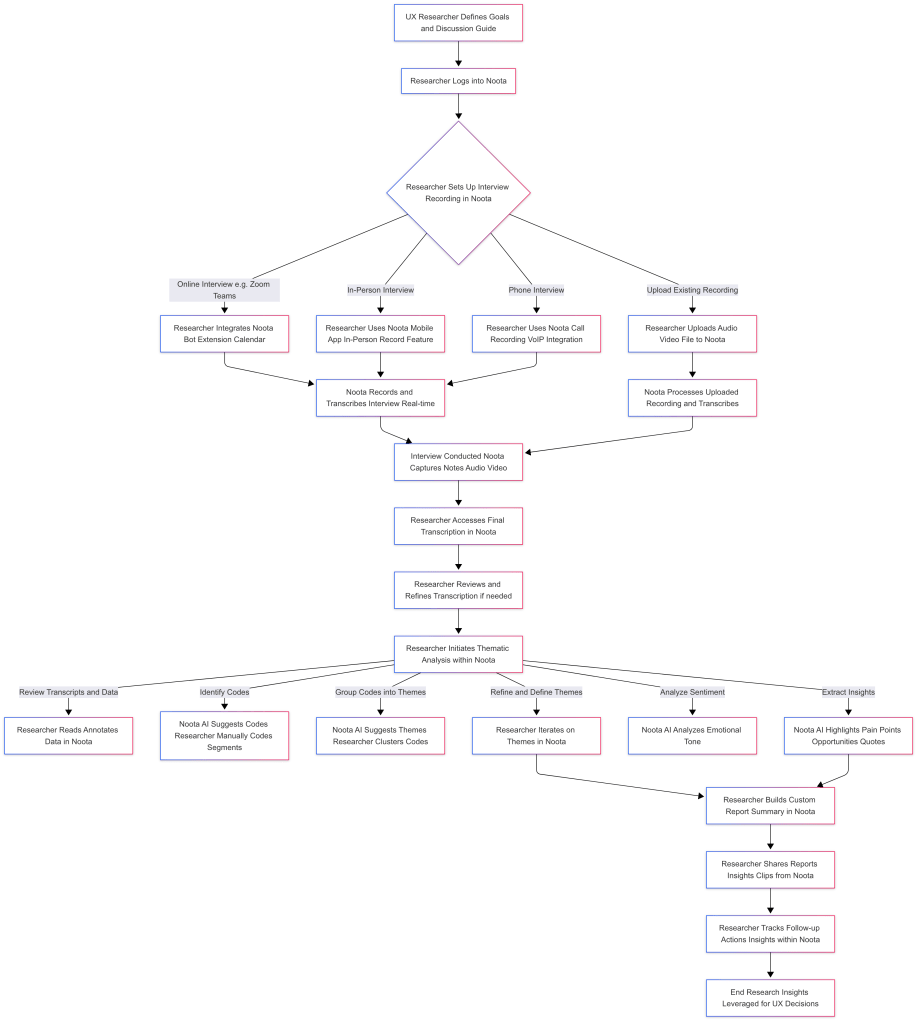
Updated Noota User Flow
Impact
Field studies and diary research showed the hidden mental strain of using a tool designed to save time. By watching users in their own environments and recording their ongoing frustrations, we gained a better understanding of both small and large UX problems. These insights have directly influenced the redesign of Noota’s transcription interface, integration features, and analysis capabilities in its current version.
 bulaieva.com